# Возвраты
#### Проставить возвраты
Вы можете запустить задачу за любой промежуток времени, чтобы выставили статусы возвратам и создались недостающие документы возвратов:
{% hint style="info" %}
🧙♂️ **Примечание:** принудительный пересмотр проставленных возвратов нужно в крайнем случае. **Обратите внимание**, что при принудительном пересмотре возвратов статусы заказов возвращаются в исходное состояние, то есть если Вы проставили в ручную свой дополнительный статус, то он будет возвращен на конечный согласно данным в API
{% endhint %}
1. Поставьте галочку на пункт **Проставить возвраты за период**
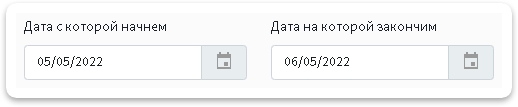
2. Выберите период за который хотите досоздать документы заказам
3. Нажмите кнопку
4. Дождитесь завершения задачи.
{% hint style="info" %}
💡**Справка.** Отслеживать выполнение задач можно в специальной *"плашке"* справа в верхнем углу:\\

{% endhint %}
{% hint style="info" %}
💡**Справка.** При нажатии на нее откроется список выполняющихся задач и задач в очереди
{% endhint %}
## Автоматически проставлять статус возврата
Включите ползунок автоматического проставления статуса возврата заказам
---
# Agent Instructions: Querying This Documentation
If you need additional information that is not directly available in this page, you can query the documentation dynamically by asking a question.
Perform an HTTP GET request on the current page URL with the `ask` query parameter:
```
GET https://help.topseller.ru/instruction/ts-connect/settings/yandex/orders/analysis-refunds.md?ask=
```
The question should be specific, self-contained, and written in natural language.
The response will contain a direct answer to the question and relevant excerpts and sources from the documentation.
Use this mechanism when the answer is not explicitly present in the current page, you need clarification or additional context, or you want to retrieve related documentation sections.

 4. Дождитесь завершения задачи.
{% hint style="info" %}
💡**Справка.** Отслеживать выполнение задач можно в специальной *"плашке"* справа в верхнем углу:\\

{% endhint %}
{% hint style="info" %}
💡**Справка.** При нажатии на нее откроется список выполняющихся задач и задач в очереди
{% endhint %}
## Автоматически проставлять статус возврата
Включите ползунок автоматического проставления статуса возврата заказам
4. Дождитесь завершения задачи.
{% hint style="info" %}
💡**Справка.** Отслеживать выполнение задач можно в специальной *"плашке"* справа в верхнем углу:\\

{% endhint %}
{% hint style="info" %}
💡**Справка.** При нажатии на нее откроется список выполняющихся задач и задач в очереди
{% endhint %}
## Автоматически проставлять статус возврата
Включите ползунок автоматического проставления статуса возврата заказам